


The incognito or private browsing mode found in most modern web browsers allows users to surf the web without leaving a digital footprint. Your browser’s history, cookies, and cache will not record the pages you visit, the items you download, or the terms you search for. For example, if you’re using a public or shared computer, the incognito mode will prevent others from seeing what you’ve been looking at online.
Although your ISP and the websites you visit cannot track your activity while in incognito mode, some information about you, like your IP address, may still be visible to them. Yet, it does protect your privacy and lessen the likelihood that your online actions would be monitored. An anonymous browsing option is standard on all modern browsers.
While each browser has a somewhat different name and method of operation, the basic idea remains the same. Today, we’ll teach you how to use the private browsing mode on the most popular web browsers, including Google Chrome, Mozilla Firefox, Microsoft’s Chromium-based Edge, and Apple’s Safari.
How to Turn on Incognito Mode in Google Chrome
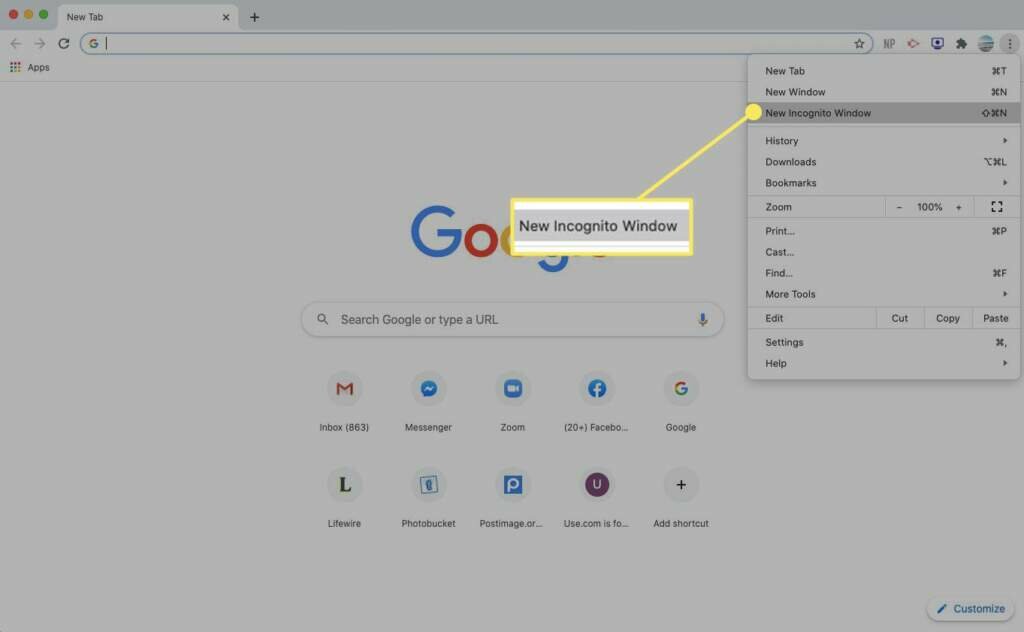
If you use the incognito mode in Google Chrome, none of your browsing history or other personal information will be saved. Here’s how to start a secure session in Chrome:

- To open a new, private tab in Chrome, click the menu button (three vertical dots) in the top right corner.
- Chrome’s Incognito mode is described in a pop-up window.
- If you right-click a link (or Control-click on a Mac), you’ll see an option to Open Link in Incognito Window.
- Just closing your browser window or tabs will take you out of Incognito mode.
How to Use InPrivate Browsing in Microsoft Edge
Microsoft Edge on Windows 10 includes an incognito mode called “InPrivate Browsing,” which allows the user to conceal their browsing history from websites.

- Launch Microsoft Edge and go to File > Additional Actions.
- A new private window should open up.
- A pop-up window describing the InPrivate Browsing mode in Edge will appear.
- Edge’s InPrivate Browsing mode can be accessed by right-clicking a link (or by using Control+Click on a Mac) and choosing Open in InPrivate Window.
Read More: How to Make Changes to PowerPoint on A Windows Pc or A Mac?
How to Turn on Private Browsing in Firefox
Mozilla Firefox has a feature called “Private Browsing” that enables incognito browsing. To use it, do as follows:

- To open a new private tab in Firefox, click the menu button (it looks like three horizontal lines) and select New Private Window.
- Firefox launches in incognito mode.
- Choose Open Link in New Private Window from the menu that appears after you right-click (or Control-click on a Mac) a link you want to view privately.
How To Enter Incognito Browsing in Apple Safari
Macs often launch Safari when you first turn on the computer. How to switch to Private Browsing in Safari:

- On a Mac, launch Safari.
- Simply go to File > Create Private Window from the main menu.
- When you select to begin private browsing, a separate window will open with a grayed-out search box and a notification to that effect.
- If you’re using Safari on a Mac, you can open a link in a private window by selecting it while holding the Control and Option keys, then right-clicking it while still holding the Option key.
Read More: How to Repair a Fire Stick that Keeps Restarting?
How to Open a Private Window in Opera
Private mode is Opera’s version of an anonymous browsing experience. The procedure is as follows:

- Fire up Opera on your Mac or PC.
- Choose “File” > “New Private Window” from the main menu.
- A pop-up window detailing Opera’s incognito settings displays.
- Simply right-click the link (or use the Control key on a Mac) and choose Open in New Private Window to see the link in a private tab within Opera.